Por Márcio Santos para o Pplware
Parece que depois do excelente artigo da Marisa Pinto intitulado Ainda te lembras do IRC?, a comunidade no IRC aumentou, principalmente no canal #pplware aumentou significativamente. No entanto, após recebermos alguns pedidos de informação de como entrar nesta grande comunidade decidi escrever um pequeno artigo a pedido do Pedro Pinto para os iniciantes neste mundo (antigo).
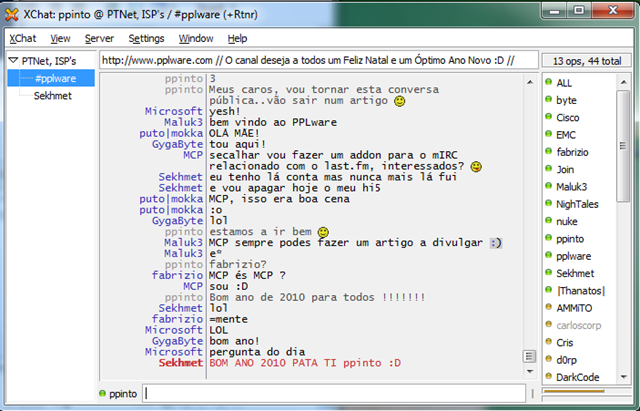
Hoje vamos apresentar o Xchat que é programa para troca de mensagens em tempo real na internet, XChat (2.8.6, na sua última versão) é um dos mais populares clientes IRC. Software multi-plataforma, é open-source e utiliza as bibliotecas GTK+ na interface gráfica com o utilizador.
A versão para Windows apesar de ser opensource é trialware por 30 dias, mas não desesperem. Há solução. Versões não oficiais do Xchat como esta o Silverex
Xchat

1. Como Instalar?
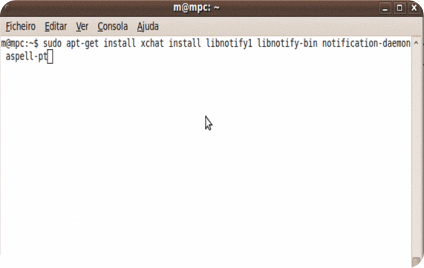
Na família Debian
sudo apt-get install xchat
Para receber notificações da bandeja de sistema
sudo apt-get install libnotify1 libnotify-bin notification-daemon
Corrector ortográfico PT
sudo apt-get install aspell-pt
2. Ligação fácil ao IRC
Ao iniciar o programa, aparece uma janela com uma lista de redes disponíveis e campos para o preenchimento de nicks é visualizada. Logo após a ligação, o XChat apresenta uma opção para se entrar num canal. Entretanto, para um utilizador mais avançado, que sabe fazer a ligação sem a necessidade duma interface gráfica, essas janelas automáticas podem ser desligadas.

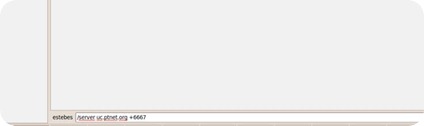
Para fazer a ligação por ssl (a PTnet tem 2 servidores com ligação ssl: UC e UEvora)
Na interface grafica: uc.ptnet.org/6667
Via linha de comandos: /server uc.ptnet.org +6667

Usando a caixa de texto, depois de escolhido o nick, /nick nick_escolhido.
A seguir fazemos os registo:
/nickserv register password email@host.com
Substituindo password pela vossa e o vosso email. Este último terá de ser um email válido, pois irão receber uma chave de identificação do nick.
Assim que receberem a chave, podem identificar o nick: /nickserv confirm <chave>



3. Opções
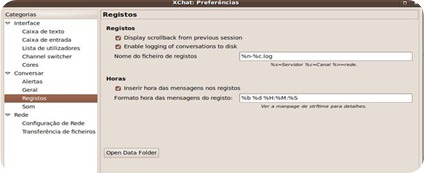
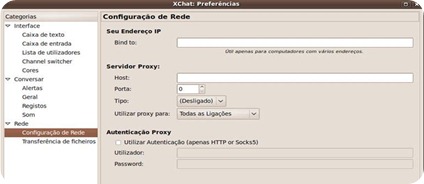
Entre as opções da interface estão configurações para a caixa de texto, caixa de mensagens recebidas e lista de nicks, com escolha de tipos de fontes e cores, além de configurações para separadores e cores.
Menu Configurações → Preferências



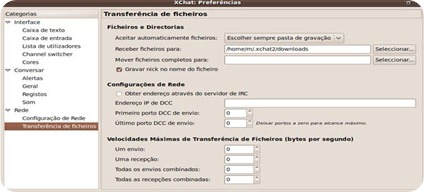
Para a transferência de binários, o XChat possibilita opções de pasta de destino temporária de download, pasta para ficheiros completos, velocidade máxima de download e upload, auto-aceitar ficheiros enviados, entre outros.
O XChat ainda apresenta suporte a plugins, vulgo scripts, programados em linguagens como C, C++,D , Perl, Python, Tcl, Ruby, Lua, LISP, Javascript e Falcon, possibilitando assim que mais recursos sejam acrescentados ao software.
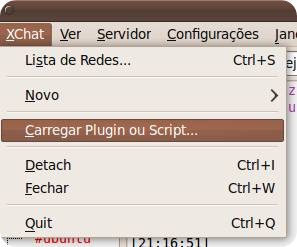
Apresenta uma série de comandos definidos pelo utilizador (alias), também conhecidos como userCommands.
Menu Configurações → Avançadas → Comandos de utilizador


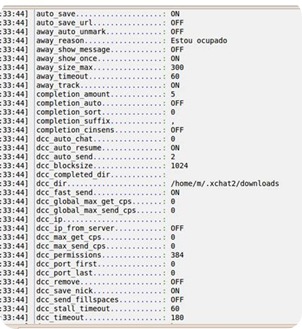
Podemos ver e editar quase todas as definições do xchat usando o comando /set, que mostra todas as definições.
A introdução multilinha na caixa de texto é feito à custa dos caracteres cr e lf (ctrl+sift+u+a) na zona onde queremos partir a linha

Corrector ortográfico usa-se da seguinte forma. Inicia-se o xchat indicando a língua (na shell, por exemplo) com >> xchat lang=pt, activa-se o corrector no xchat /set gui_input_spell on e testa-se.
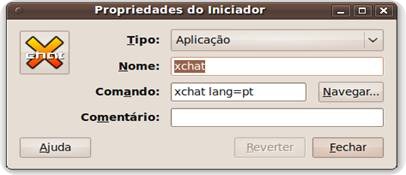

Agora vamos dizer olá ao Pedro Pinto no #pplware. Não vou explicar o conteúdo, isso fica para um próximo artigo.
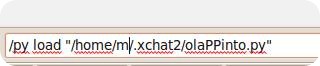
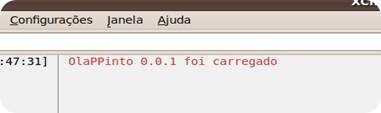
Colocar o seguinte código num ficheiro chamado olaPPinto.py em ~/.xchat2 . Para carregar o script, é só fazer /py load “/home/<user>/.xchat2/olaPPinto.py” na caixa de introdução texto. Atenção à indentação do código, o python é indent sensitive.
#!/usr/local/bin/python
# coding: latin-1
import xchat
__module_name__ = “OlaPPinto”
__module_version__ = “0.0.1”
__module_description__ = “pplware”
print “\0034″,__module_name__, __module_version__,”foi carregado\003”
def on_join(word, word_eol, userdata):
triggernick, triggerchannel, triggerhost = word
destination = xchat.get_context()
if triggernick == ‘ppinto’ and triggerchannel == ‘#pplware’ :
destination.command(“say Olá ” + triggernick + “, grande guru da área de redes do ” + triggerchannel)
xchat.hook_print(‘Join’, on_join)
5. Dicas úteis:
Abrir a janela de user commands.
Configurações (Settings) -> Avançadas (Advanced) -> Comandos de utilizador (User Commands)
Procurar o alias J, alterar o conteúdo para join #&2 (para poder fazer /j pplware sem o #)
Carregar em Gravar.

/charset IRC # isto é (Latin-1/UTF-8 hybrid) – definir charset
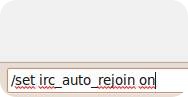
/set irc_auto_rejoin on – activar autorejoin
/set stamp_text on – mostrar tempo na caixa de mensagens
/set stamp_text_format [%H:%M:%S] – definir formato do timestamp na caixa de mensagens (aparece sobreposta, é preciso arrastar a barra onde estão os nicks)
/away msg – definir estado de away
/back – regressar do away
Executar comandos do sistema: /exec -o uname -r
Para abrir um query (o famoso “PVT”), basta digitar /query <nick da pessoa>, que vai abrir uma janela para vocês conversarem 😉

7. Lista de comandos
lista de comandos roubada sem alarido do t0x
ADDBUTTON ADDBUTTON <name> <action>, Adds a button under the user-list.
ALLCHAN ALLCHAN <cmd>, Sends a command to all channels on all servers.
ALLCHANL ALLCHANL <cmd>, Sends a command to all channels on the current server.
ALLSERV ALLSERV <cmd>, Sends a command to all servers you’re in.
AWAY AWAY [<reason>], Sets you away.
BACK BACK, Sets you back (not away).
BAN BAN <mask> [<bantype>], Bans everyone matching the mask from the current channel.
If they are already on the channel this doesn’t kick them (needs chanop).
CHANOPT CHANOPT [-quiet] <variable> [<value>]
CHARSET CHARSET [], e.g. /CHARSET IRC, /CHARSET UTF-8, /CHARSET ISO-8859-2
CLEAR CLEAR [NUM|-NUM|ALL|HISTORY], clears the current text window,
NUM/-NUM e.g. /CLEAR 3, clears the top 3 lines of text of the current window
/CLEAR -10, clears the last 10 lines of text of the current window
ALL, clears text from all windows,
HISTORY, clears command history of current window.
CLOSE CLOSE, Closes the current window/tab.
COUNTRY COUNTRY [-s] <code|wildcard>, Finds a country code, eg: au = australia.
CTCP CTCP <nick> <message>, Send the CTCP message to nick, common messages are VERSION and USERINFO.
CYCLE CYCLE [<channel>], Parts the current or given channel and immediately rejoins.
DCC
DCC GET <nick> – Accept an offered file.
DCC SEND [-maxcps=#] <nick> [file] – Send a file to someone.
DCC PSEND [-maxcps=#] <nick> [file] – Send a file using passive mode.
DCC LIST – Show DCC list.
DCC CHAT <nick> – Offer DCC CHAT to someone.
DCC PCHAT <nick> – Offer DCC CHAT using passive mode.
DCC CLOSE <type> <nick> <file> Example: /dcc close send johnsmith file.tar.gz
DEBUG
DEHOP DEHOP <nick>, Removes chanhalf-op status from the nick on the current channel (needs chanop).
DELBUTTON DELBUTTON <name>, Deletes a button from under the user-list.
DEOP DEOP <nick>, Removes chanop status from the nick on the current channel (needs chanop).
DEVOICE DEVOICE <nick>, Removes voice status from the nick on the current channel (needs chanop).
DISCON DISCON, Disconnects from server.
DNS DNS <nick|host|ip>, Finds a users IP number.
ECHO ECHO <text>, Prints text locally.
EXEC EXEC [-o] <command>, Runs the command. If -o flag is used then output is sent to current channel, else is printed to current text box.
EXECCONT EXECCONT, Sends the process SIGCONT.
EXECKILL EXECKILL [-9], Kills a running exec in the current session. If -9 is given the process is SIGKILL’ed.
EXECSTOP EXECSTOP, Sends the process SIGSTOP.
EXECWRITE EXECWRITE, Sends data to the processes stdin.
FLUSHQ FLUSHQ, Flushes the current server’s send queue.
GATE GATE <host> [<port>], Proxies through a host, port defaults to 23.
GETFILE GETFILE [-folder] [-multi] [-save] <command> <title> [<initial>]
GETINT GETINT <default> <command> <prompt>
GETSTR GETSTR <default> <command> <prompt>
GHOST GHOST <nick> <password>, Kills a ghosted nickname.
GUI GUI [APPLY|ATTACH|DETACH|SHOW|HIDE|FOCUS|FLASH|ICONIFY|COLOR <n>]
GUI [MSGBOX <text>|MENU TOGGLE]
GUI APPLY -Similar to clicking OK in the settings window.
Execute this after /SET to activate GUI changes (2.8.0+)
GUI ATTACH -Same function as “Attach Window” in the XChat menu (2.6.2+)
GUI DETACH -Same function as “Detach Tab” in the XChat menu (2.6.2+)
GUI SHOW -Show the main xchat window (if currently hidden)
GUI HIDE -Hide the main xchat window completely (this is used by the Systray plugin)
GUI FOCUS -Focus the current window or tab
GUI FLASH -Flash the taskbar button.
It will flash only if the window isn’t focused and will stop when it is focused by the user
GUI ICONIFY -Iconify (minimize to taskbar) the current xchat window
GUI COLOR n -Change the tab color of the current context, where n is a number from 0 to 3
GUI MSGBOX text -Displays a asynchronous message box with your text
GUI MENU TOGGLE -Shows/Hides the menu bar
HELP HELP <command>, Gives information about a help command, e.g. /HELP HOP
HOP HOP <nick>, Gives chanhalf-op status to the nick (needs chanop.)
ID ID <password>, Identifies yourself to nickserv.
IGNORE
(more info) IGNORE <mask> <types..> <options..>
mask – Hostmask to ignore, eg: *!*@*.aol.com
types – types of data to ignore, one or all of: PRIV, CHAN, NOTI, CTCP, DCC, INVI, ALL
options – NOSAVE, QUIET
INVITE INVITE <nick> [<channel>], Invites someone to a channel, by default the current channel (needs chanop).
JOIN JOIN <channel>, Joins the channel.
KICK KICK <nick>, Kicks the nick from the current channel (needs chanop).
KICKBAN KICKBAN <nick>, Bans then kicks the nick from the current channel (needs chanop).
KILLALL KILLALL, Immediately exit.
LAGCHECK LAGCHECK, Forces a new lag check.
LASTLOG LASTLOG <string>, Searches for a string in the buffer.
LIST LIST, Gives a list of channels on the network, /list [channel] gives channelname, useramount and topic.
LOAD LOAD [-e] <file>, Loads a plugin or script.
MDEHOP MDEHOP, Mass deop’s all chanhalf-ops in the current channel (needs chanop).
MDEOP MDEOP, Mass deop’s all chanops in the current channel (needs chanop).
ME ME <action>, Sends the action to the current channel (actions are written in the 3rd person, like /me jumps).
MENU
(more info) MENU [-eX] [-i<ICONFILE>] [-k<mod>,<key>] [-m] [-pX] [-r<X,group>] [-tX] {ADD|DEL} <path> [command] [unselect command]
MKICK MKICK, Mass kicks everyone except you in the current channel (needs chanop).
MODE MODE [channel] +/- channelmode, Sets or removes channelmodes, e.g.
/mode #channel -s,
/mode #channel +o Johnny
MOP MOP, Mass op’s all users in the current channel (needs chanop).
MSG MSG <nick> <message>, Sends a private message.
NAMES NAMES, Lists the nicks on the current channel.
NCTCP NCTCP <nick> <message>, Sends a ctcp notice.
NEWSERVER NEWSERVER [-noconnect] <hostname> [<port>]
NICK NICK <nickname>, Sets your nick.
NOTICE NOTICE <nick/channel> <message>, Sends a notice. Notices are a type of message that should be auto reacted to.
NOTIFY NOTIFY [-n network1[,network2,…]] [<nick>], Displays your notify list or adds someone to it.
OP OP <nick>, Gives chanop status to the nick (needs chanop).
PART PART [<channel>] [<reason>], Leaves the channel, by default the current one.
PING PING <nick | channel>, CTCP pings nick or channel.
QUERY QUERY <nick>, Opens up a new privmsg window to someone.
QUIT QUIT [<reason>], Disconnects from the current server.
QUOTE QUOTE <text>, Sends the text in raw form to the server.
RECONNECT RECONNECT [-ssl] [<host>] [<port>] [<password>], Can be called just as
/RECONNECT to reconnect to the current server or with /RECONNECT ALL to reconnect to all the open servers.
RECV RECV <text>, Sends raw data to xchat, as if it was received from the irc server.
SAY SAY <text>, Sends the text to the object in the current window.
SEND SEND <nick> [<file>]
SERVCHAN SERVCHAN [-ssl] <host> <port> <channel>, Connects and joins a channel.
SERVER SERVER [-ssl] <host> [<port>] [<password>], Connects to a server, the default port is 6667 for normal connections, and 9999 for ssl connections.
SET
(set variables) SET [-e] [-or] [-quiet] <variable> [<value>]
SETCURSOR SETCURSOR [-|+] <position>
SETTAB SETTAB <name>, Changes the name of the current tab.
SETTEXT
SPLAY SPLAY <soundfile>
TIMER
(more info) TIMER [-refnum ] [-repeat ] , Delays or repeats a command/message.
TIMER [-quiet] -delete , Deletes timer.
TOPIC TOPIC [<topic>], Sets the topic if one is given, else shows the current topic.
TRAY
TRAY -f <timeout> <file1> [<file2>] -Flash tray between two icons.
TRAY -f <filename> -Set tray to a fixed icon.
TRAY -i <number> -Flash tray with an internal icon.
TRAY -t <text> -Set the tray tooltip.
TRAY -b <title> <text> -Set the tray balloon.
UNBAN UNBAN <mask> [<mask>…], Unbans the specified masks.
UNIGNORE
(more info) UNIGNORE <mask> [QUIET]
UNLOAD UNLOAD <name>, Unloads a plugin or script.
URL URL <url>, Opens a url in your browser.
USELECT USELECT [-a] [-s] <nick1> <nick2> etc, Highlights nick(s) in channel userlist.
USERLIST USERLIST [channel], Gives a list of users in the given channel, with ov (@+),
away and lt(last talked in secs) info.
VOICE VOICE <nick>, Gives voice status to someone (needs chanop).
WALLCHAN WALLCHAN <message>, Writes the message to all channels.
WALLCHOP WALLCHOP <message>, Sends the message to all chanops on the current channel.
6. Mais sobre o XChat
 Download:Versão não oficial para Windows (freeware) – Silverex
 Homepage: Aqui e Aqui
Homepage: Xchat
PUB
PUB.











PUB.
Velocímetro Pplware

Teste a velocidade da sua Internet